Skip to content

ChatGPT follow-up suggestions

ChatGPT follow-up suggestions that keep the conversation moving

GPT Master gives you contextual follow-up suggestions right after a response, so you always know what to ask next without breaking flow.

  • Local-first organization inside ChatGPT
  • Folders, search, timestamps, and navigation in one layer
  • Fast setup with no account required for core features

Quick answer

GPT Master gives you contextual follow-up suggestions right after a response, so you always know what to ask next without breaking flow.

chatgpt.com
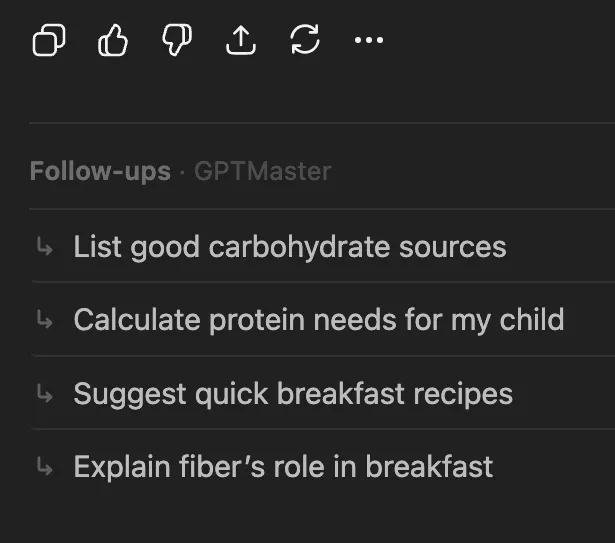
GPT Master showing ChatGPT follow-up suggestion chips directly below a response

Shown inside chatgpt.com: GPT Master adds structure without forcing a separate workspace or a new learning curve.

Native friction

Why momentum matters in ChatGPT

  • A good ChatGPT workflow often fails after a useful answer.
  • You stop because you are not sure what the next prompt should be.
  • That pause breaks momentum in writing, research, coding, and planning sessions.

What changes

How GPT Master follow-ups help

  • Get one-click follow-up prompts based on the current conversation.
  • Keep writing, researching, planning, or debugging without losing momentum.
  • Use heuristic fallback or enhanced generation depending on how you want the feature to work.

How it works

How follow-up suggestions improve prompt quality

This feature is about continuation quality, not a generic prompt library. Good follow-ups help you keep the current line of thinking moving without extra friction.

  1. 1

    Finish a response and see immediate follow-up options without leaving the thread.

  2. 2

    Pick the next prompt that deepens the current line of thinking instead of starting over from scratch.

  3. 3

    Keep long writing, research, and planning sessions moving with less cognitive overhead between turns.

Who this page is for

Common ways people use GPT Master

The strongest SEO page is still useful to a real buyer. These are the day-to-day jobs this workflow solves once ChatGPT becomes part of your actual operating system.

  1. 01

    Writers continuing a draft instead of stalling after a good paragraph.

  2. 02

    Researchers pushing deeper into an analysis thread with the next obvious question.

  3. 03

    Builders and operators keeping planning conversations moving without switching context.

Frequently asked

Questions people have before they install

These questions cover fit, workflow, and what to expect before installing GPT Master, so people can understand the feature in practical terms before clicking through to the Chrome Web Store.

Are follow-up suggestions just generic prompt ideas?

No. The goal is to continue the current conversation with context-aware next steps, not dump a static library of unrelated prompt templates onto the page.

Who gets the most value from this feature?

People doing iterative work in ChatGPT, especially writing, research, planning, and analysis where a strong next question often matters more than the first prompt.

Why does this matter for productivity?

A lot of momentum is lost between turns. Follow-up suggestions reduce that pause, so users can stay inside the thread and keep useful thinking moving.