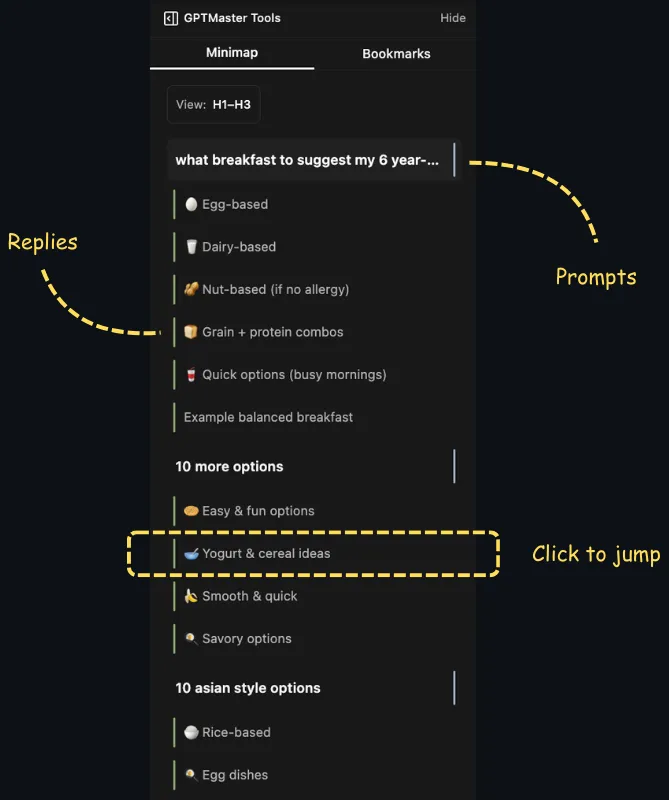
A ChatGPT minimap for fast navigation in long threads
GPT Master adds a conversation minimap so you can scan long threads, jump to the right section, and stop scrolling through 50 or 100 messages to find your place.
Folders, search, timestamps, and navigation in one layer
Fast setup with no account required for core features
Quick answer
GPT Master adds a conversation minimap so you can scan long threads, jump to the right section, and stop scrolling through 50 or 100 messages to find your place.
chatgpt.com
Shown inside chatgpt.com: GPT Master adds structure without forcing a separate workspace or a new learning curve.
Native friction
Why long ChatGPT threads break down
Long ChatGPT threads are useful, but they are hard to navigate.
Once a conversation gets deep, finding one specific section turns into friction.
Scrolling through dense threads slows down research, debugging, and writing workflows.
What changes
How the minimap helps
Get a compact overview of the thread structure.
Jump directly to the part you need instead of manually scrolling.
Stay in flow during research, debugging, writing, and spec work.
How it works
How the minimap fits into deep-thread work
Minimap is a navigation tool for serious thread depth. It works best when long research, debugging, or planning threads become too dense to scan linearly.
1
Open a long conversation and scan the thread structure without reading every message again.
2
Jump straight to the section you need instead of manually scrolling through dozens of turns.
3
Use minimap together with follow-ups and bookmarks to keep long-running work both navigable and reusable.
Who this page is for
Common ways people use GPT Master
The strongest SEO page is still useful to a real buyer. These are the day-to-day jobs
this workflow solves once ChatGPT becomes part of your actual operating system.
01
Researchers scanning long synthesis and source-analysis threads.
02
Developers jumping between problem statements, code blocks, and fixes.
03
Product teams navigating long planning or QA conversations without losing place.
Frequently asked
Questions people have before they install
These questions cover fit, workflow, and what to expect before installing GPT Master,
so people can understand the feature in practical terms before clicking through to the
Chrome Web Store.
What is a ChatGPT minimap?
It is a compact overview of a long conversation that helps you jump to the right section without manually scrolling through the entire thread.
When does a minimap become useful?
Usually once a conversation is long enough that the thread stops being easy to scan linearly. Research, debugging, and planning conversations hit that threshold quickly.
Does minimap replace folders or bookmarks?
No. It solves navigation inside one long thread, while folders and bookmarks help you manage and reopen the right conversations across your broader ChatGPT workspace.